

Inventory reorder automation helps businesses make restocking decisions with better timing, cleaner data, and less manual guesswork.
Instead of waiting until shelves are empty, teams can use inventory data, reorder points, lead times, low stock alerts, and purchase order workflows to replenish products before shortages create lost sales, customer frustration, rushed shipping costs, or operational delays.
For retailers, restaurants, eCommerce sellers, warehouses, and multi-location businesses, inventory problems often come from the same sources: inaccurate counts, supplier delays, fast-moving products selling faster than expected, slow-moving inventory tying up cash, and team members relying on spreadsheets or memory.
Inventory reorder automation does not remove every risk, but it can make the replenishment process more consistent and easier to manage.
At its best, an automated reorder system helps teams understand what needs attention, when to reorder, how much to buy, and which supplier should be used.
It can support reorder alerts, automatic inventory replenishment suggestions, supplier reorder automation, draft purchase orders, approval workflows, and inventory reports that help managers make better purchasing decisions.
The key is using automation responsibly. Good inventory management automation depends on accurate stock counts, clean SKU data, realistic reorder point settings, dependable supplier records, and regular human review.
What Inventory Reorder Automation Means
Inventory reorder automation is the process of using inventory software, POS data, warehouse records, or an inventory replenishment system to monitor stock levels and trigger restocking actions when inventory reaches a defined threshold.
In everyday operations, that may mean the system sends low stock alerts, recommends reorder quantities, creates draft purchase orders, or routes an order request to a manager for approval.
The goal is not to let software make every purchasing decision without oversight. The goal is to reduce avoidable manual work and give teams faster, more reliable visibility into what needs to be reordered.
A well-configured inventory reorder system compares current stock levels against reorder points, safety stock, sales velocity, supplier lead time, and purchasing rules.
For example, a retail store may sell a popular item every day. If the supplier usually takes several days to deliver, the store should not wait until the item is almost gone. Inventory reorder automation can alert the team when stock reaches the minimum stock level needed to cover expected sales during the supplier’s lead time.
In a restaurant, the same idea applies to ingredients, packaging, beverages, and supplies. In eCommerce, it may apply to marketplace inventory, warehouse stock, returned items, and advertising-driven demand spikes. In a warehouse, reorder point automation may support bins, pallets, SKUs, vendor minimums, and receiving schedules.
Inventory replenishment automation can also support better inventory control automation by connecting different parts of the workflow. Sales reduce inventory. Returns may add inventory back. Transfers move stock between locations. Receiving updates available stock. Inventory reports show what is moving quickly, what is sitting too long, and what needs attention.
This makes automated inventory reordering especially useful for businesses that have many SKUs, multiple suppliers, recurring stockouts, seasonal demand, or limited time for manual stock reviews.
Still, automation is only as accurate as the data behind it. If stock counts are wrong, barcodes are duplicated, supplier lead times are outdated, or reorder points are never reviewed, the system may recommend poor purchases. That is why inventory reorder automation should be treated as a decision-support tool, not a replacement for inventory judgment.
How Automated Inventory Reordering Works
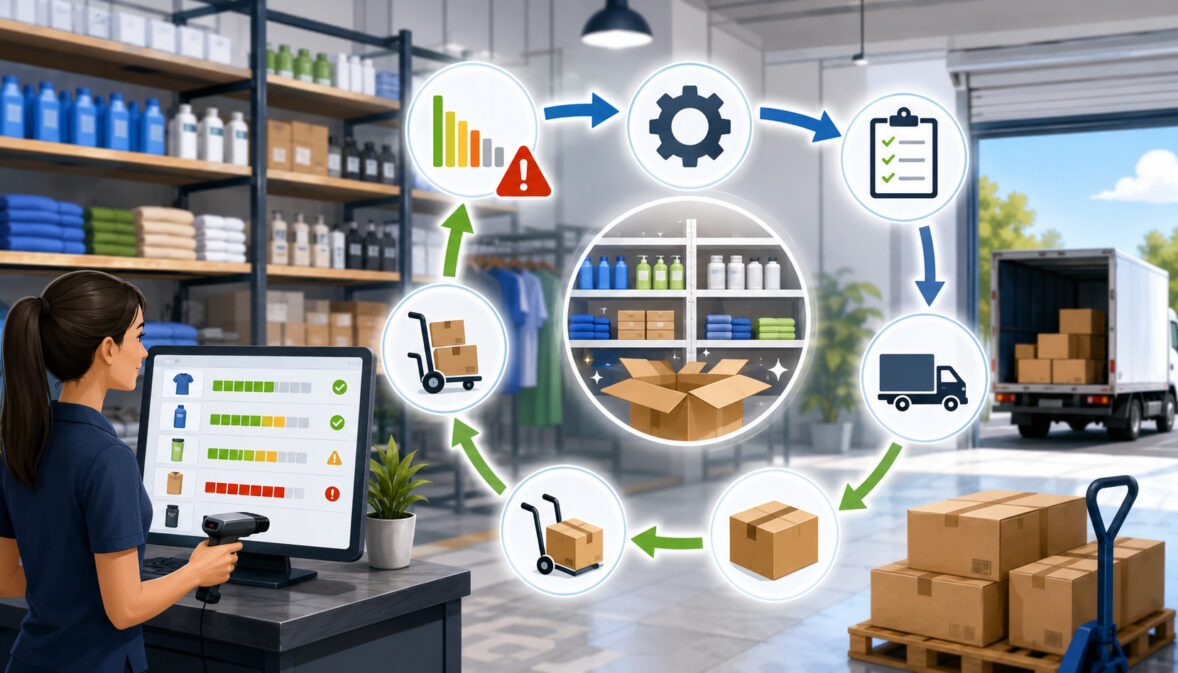
Automated inventory reordering works by connecting inventory movement, reorder rules, supplier information, and purchasing workflows. The system monitors stock levels as products are sold, received, returned, adjusted, or transferred.
When available inventory falls to a preset reorder point, the system creates an alert, recommends a purchase quantity, or starts a replenishment workflow.
Most businesses begin by setting up product records. Each item needs a clear SKU, barcode, product name, category, cost, supplier, unit of measure, and current stock count. Without that foundation, the automated reorder system may not know which item to track, which supplier to use, or how much stock is actually available.
Next, the business sets reorder points. A reorder point is the stock level at which a new order should be considered. It is usually based on average daily sales, supplier lead time, and safety stock. A fast-moving product with a long supplier lead time usually needs a higher reorder point than a slow-moving product that can be restocked quickly.
The system may also use sales history and POS analytics to understand sales velocity. If a product sells ten units per day and the supplier takes five days to deliver, the business needs enough inventory to cover that lead time. Safety stock adds a buffer for supplier delays, demand spikes, receiving errors, or unexpected sales increases.
When inventory reaches the reorder trigger, the system may send inventory reorder alerts to the team. Some systems create a draft purchase order. Others recommend order quantities based on minimum stock level, maximum stock level, supplier minimum order quantities, case packs, and forecast demand.
A manager may then review the order. This step matters because automated purchase orders should not ignore cash flow, upcoming changes, discontinued items, vendor issues, or current promotions.
Once approved, the purchase order can be sent to the supplier. When the order arrives, receiving staff count the shipment, compare it with the purchase order, update inventory, and record any shortages or backorders.
This cycle creates a replenishment workflow that becomes easier to manage over time. The more accurate the stock counts, sales history, supplier records, and receiving process are, the more useful inventory restocking automation becomes.
Stock Level Tracking
Stock level automation depends on accurate inventory movement. Every sale, return, transfer, receiving event, damage adjustment, shrinkage adjustment, and manual correction affects what the system believes is available. If those movements are not recorded correctly, automated replenishment decisions may be based on false numbers.
For example, if a product is sold but the sale does not reduce inventory, the system may think more units are available than actually exist. If a return is added back to stock even though the item is damaged, inventory may be overstated. If a transfer between locations is not recorded, one location may appear overstocked while another appears short.
Barcode scanning can improve stock accuracy because it reduces manual entry errors. Stock counts and cycle counts also help teams confirm whether system records match physical inventory. For reorder automation, this is critical because the reorder trigger depends on the available stock number.
Accurate stock level tracking also helps teams separate normal sales demand from inventory problems. If an item appears to be selling quickly, but the real issue is shrinkage or receiving errors, the business may reorder too much. Inventory accuracy makes automated inventory reordering more reliable.
Reorder Points and Low Stock Alerts
Reorder points tell the system when inventory should be reviewed for replenishment. Low stock alerts notify the team when an item reaches that threshold. Together, they form the basic engine behind reorder point automation.
A reorder point is not the same as zero stock. It should be set high enough to cover expected demand while the business waits for the next supplier delivery. If the reorder point is too low, stockouts may happen before the order arrives. If it is too high, the business may carry excess inventory and tie up cash.
Low stock alerts are helpful because they give teams time to act before a product runs out. They can be especially useful for fast-moving products, essential ingredients, packaging supplies, high-margin items, or SKUs with unpredictable supplier timelines.
The best alerts are specific and actionable. Instead of simply warning that stock is low, a good workflow should show current quantity, reorder point, suggested order quantity, supplier, recent sales velocity, lead time, and any pending purchase orders. That information helps the team avoid duplicate orders and make better replenishment decisions.
Purchase Order Automation
Purchase order automation helps reduce the manual work involved in creating, checking, approving, and sending supplier orders. When inventory reaches a reorder point, the system may create a draft purchase order using supplier records, item costs, preferred quantities, minimum order quantities, and reorder rules.
This can save time for managers who would otherwise review inventory reports line by line. It can also reduce missed items because the system continuously monitors stock levels. However, automated purchase orders should usually include review steps, especially for expensive items, seasonal products, slow-moving inventory, or products with uncertain demand.
Approval rules make the workflow safer. A business may allow automatic draft creation but require manager approval before an order is sent. It may also require approval for large quantities, high-cost orders, new suppliers, unusual demand spikes, or products nearing discontinuation.
When used carefully, purchase order automation can improve purchasing consistency, reduce manual errors, and help teams respond faster to reorder alerts without losing control of buying decisions.
Key Components of an Automated Reorder System

An automated reorder system needs more than a low-stock notification. To work well, inventory replenishment automation needs accurate product data, reliable stock counts, supplier information, demand history, reorder point settings, safety stock rules, approval workflows, and receiving discipline.
Clean product data is the first requirement. Each product should have a unique SKU, correct barcode, clear category, accurate cost, unit of measure, supplier record, and current stock quantity.
If a product comes in cases but sells as single units, the system must understand that relationship. If a restaurant buys ingredients by the case but uses them by the ounce, units of measure must be carefully configured.
Supplier information is another key component. Reorder automation depends on lead time, minimum order quantity, order frequency, case pack size, supplier cost, shipping rules, and fill rate. If supplier lead time changes but the system is not updated, reorder points may become too low.
Sales history and demand patterns help the system understand how quickly products move. Fast-moving products may need higher reorder points and closer monitoring. Slow-moving inventory may need lower reorder quantities or manual review. Seasonal demand, promotions, local events, menu changes, and advertising campaigns may all affect reorder timing.
Approval rules protect the business from over-ordering. They allow managers to review large orders, unusual recommendations, or items with cash flow impact. Receiving workflows complete the cycle by ensuring delivered inventory is counted, recorded, and matched against the purchase order.
Inventory reports and dashboards help managers evaluate whether the automation is working. Important reports may show stockout frequency, overstock rate, supplier delays, sell-through rate, purchase order cycle time, and inventory turnover.
Clean Product and SKU Data
Clean product and SKU data is the foundation of inventory management automation. Every item should have a consistent name, unique SKU, scannable barcode when applicable, category, cost, selling unit, supplier, and active status. Without clean records, the system may track the wrong item, reorder duplicates, or miss products that need attention.
SKU management becomes especially important when products have sizes, colors, flavors, variants, bundles, ingredients, or multiple packaging formats. A business may buy a product by the case, stock it by the unit, and sell it individually. If those relationships are not set correctly, the inventory reorder system may recommend incorrect quantities.
Product costs also matter. If costs are outdated, purchase order recommendations may not reflect real cash requirements. If categories are messy, managers may struggle to review inventory reports. If supplier records are missing, draft purchase orders may require too much manual correction.
Before using automated replenishment, teams should review inactive items, duplicate SKUs, barcode errors, unit-of-measure issues, and products assigned to the wrong supplier. Clean data makes every reorder alert more trustworthy.
Supplier Lead Time
Supplier lead time is the time between placing an order and receiving usable inventory. It affects when a business should reorder because inventory must last until the next shipment arrives. If lead time is underestimated, the business may run out before replenishment arrives.
Lead time includes more than shipping time. It may include supplier processing, order cutoff schedules, production time, freight delays, receiving, inspection, labeling, and stocking. For restaurants, it may include delivery schedules and product availability. For eCommerce sellers, it may include warehouse receiving and fulfillment preparation.
Supplier delays can make reorder point automation less reliable if the system uses outdated assumptions. A supplier that once delivered in two days may now take five. A seasonal product may require longer planning. A vendor may have backorders or minimum order rules that affect timing.
Businesses should track actual lead time over multiple orders, not just the supplier’s estimate. If delays are common, reorder points and safety stock should be adjusted. Supplier management is part of good inventory control automation because replenishment timing depends on dependable vendor data.
Safety Stock
Safety stock is extra inventory kept as a buffer against uncertainty. It protects the business when demand is higher than expected, suppliers are late, shipments are short, forecasts are wrong, or stock counts are slightly off.
Safety stock is not meant to encourage overbuying. It is meant to reduce risk for important products. A fast-selling product, critical ingredient, or high-margin item may need more safety stock than a slow-moving item. Products with long lead times or unreliable suppliers may also need a larger buffer.
For example, if a store usually sells five units per day and a supplier takes four days to deliver, the store expects to sell about twenty units during lead time. If demand sometimes spikes or shipments arrive late, the business may add safety stock so it does not run out too quickly.
Safety stock should be reviewed regularly. Too little safety stock increases stockout risk. Too much safety stock increases carrying costs, storage pressure, spoilage risk, markdowns, and cash flow strain. Good inventory reorder automation balances availability with cost control.
Reorder Point Automation Explained
Reorder point automation uses stock thresholds to decide when a product should be reviewed for replenishment. Instead of manually checking every SKU every day, the system monitors inventory levels and triggers an alert or replenishment workflow when stock reaches the reorder point.
A reorder point is usually based on three main factors: average daily sales, supplier lead time, and safety stock. Average daily sales shows how quickly the product moves. Lead time shows how long it takes to receive new inventory. Safety stock adds a buffer for demand spikes, supplier delays, and uncertainty.
For example, a product that sells quickly and takes a long time to replace needs a higher reorder point. A product that sells slowly and can be restocked quickly may need a lower reorder point. This is why demand-based reordering is more useful than setting the same minimum stock level for every item.
Reorder point automation can also account for maximum stock level. A minimum stock level tells the system when to reorder. A maximum stock level helps prevent over-ordering. Together, they help control both stockout prevention and overstock reduction.
However, reorder points should not remain unchanged forever. Sales velocity changes. Suppliers slow down or improve. Costs rise. Seasonal demand shifts. Products become more or less popular. Promotions can temporarily increase demand. New competitors or product substitutions can reduce demand.
A good inventory reorder system supports regular review. Teams should compare reorder alerts with actual sales history, stockout frequency, pending purchase orders, and supplier performance. Reorder point automation works best when it is treated as a living process.
Basic Reorder Point Formula
A simple reorder point formula is:
Reorder point = average daily sales × supplier lead time + safety stock
This formula estimates how much inventory the business needs while waiting for the next order to arrive, plus a buffer. It is widely used because it connects reorder timing to real demand and supplier timing.
Here is a simple example. Suppose a product sells about eight units per day. The supplier usually takes five days to deliver. The business wants to keep ten units as safety stock.
Eight units per day multiplied by five days equals forty units. Add ten units of safety stock. The reorder point is fifty units. When inventory falls to fifty units, the business should review or place a replenishment order.
This does not mean every business should use only one formula without judgment. Some products have seasonal spikes, supplier minimums, case pack rules, storage limits, expiration dates, or cash flow constraints. The formula gives a useful starting point, but managers should adjust it based on real-world conditions.
For a deeper explanation of reorder point calculations, educational supply chain resources commonly define reorder point as average demand during lead time plus safety stock.
When to Adjust Reorder Points
Reorder points should be adjusted whenever demand, supply, or business priorities change. A reorder point that worked last month may be wrong if sales velocity changes, supplier lead time increases, or a product becomes seasonal.
Promotions are a common reason to update reorder settings. If a business plans to feature a product in ads, discounts, displays, email campaigns, or menu specials, demand may rise temporarily. A normal reorder point may not be enough to support the increase.
Supplier changes also matter. If a vendor begins shipping slower, has frequent backorders, raises minimum order quantities, or changes delivery days, reorder point automation should reflect those changes. Supplier reorder automation cannot work well with outdated vendor records.
Businesses should also review reorder points for slow-moving inventory. If a product sells less often than expected, the system may keep recommending unnecessary replenishment. That can increase carrying costs and tie up cash.
Seasonal demand, local events, weather patterns, holidays, school schedules, tourism cycles, and product life cycles can all affect demand. Reorder points should be reviewed regularly so automated inventory reordering stays aligned with actual business conditions.
Benefits of Inventory Replenishment Automation

Inventory replenishment automation can help businesses improve stock control, purchasing speed, and operational consistency. The biggest benefit is visibility. Teams can see which products are approaching reorder points, which items are already low, which purchase orders are pending, and which suppliers may affect replenishment timing.
One major advantage is fewer preventable stockouts. When low stock alerts are based on real-time inventory tracking, sales velocity, and lead time, teams have more time to reorder before popular items run out. This supports customer satisfaction because shoppers are more likely to find the products they expect.
Another benefit is reduced manual work. Without automation, managers may need to scan reports, walk shelves, check spreadsheets, email suppliers, and create purchase orders manually. Inventory reorder automation can shorten this process by identifying items that need review and creating draft purchase orders.
Automation can also improve purchasing decisions. Inventory reports can show fast-moving products, slow-moving inventory, sales history, inventory turnover, supplier delays, and order frequency. With better data, teams can avoid buying based only on habit or guesswork.
Overstock reduction is another important benefit. Automated replenishment can help businesses avoid ordering too much by using actual stock levels and demand patterns. This may reduce carrying costs, storage pressure, markdowns, spoilage, and cash tied up in products that are not moving.
For multi-location businesses, reorder automation can help show where inventory is needed and where it is sitting idle. Instead of placing new supplier orders immediately, teams may transfer stock between locations when appropriate.
Inventory reorder automation can also improve accountability. Approval rules, purchase order records, receiving logs, and inventory dashboards create a clearer trail of what was ordered, when it was approved, what arrived, and what still needs attention.
Inventory Reorder Automation Metrics to Track
Tracking metrics helps businesses understand whether inventory reorder automation is improving replenishment or simply creating more alerts. Metrics also help teams identify where settings need adjustment, where supplier issues exist, and where purchasing decisions may be hurting cash flow.
| Metric | What It Measures | Why It Matters | How Automation Helps |
| Reorder point | The stock level that triggers review or replenishment | Helps teams reorder before inventory runs out | Sends inventory reorder alerts when stock reaches the threshold |
| Safety stock | Buffer inventory kept for uncertainty | Protects against demand spikes and supplier delays | Adds a risk buffer to reorder calculations |
| Lead time | Time between ordering and receiving usable stock | Affects how early a business must reorder | Uses supplier timing to trigger replenishment earlier |
| Sales velocity | How quickly a product sells | Identifies fast-moving and slow-moving products | Adjusts reorder timing based on demand patterns |
| Inventory turnover | How often inventory is sold and replaced | Shows how efficiently stock is moving | Highlights products that may need different reorder settings |
| Stockout frequency | How often products run out | Indicates lost sales risk and poor reorder timing | Helps identify items with reorder points set too low |
| Overstock rate | How often stock exceeds needed levels | Shows cash and storage tied up in excess inventory | Helps prevent unnecessary replenishment |
| Sell-through rate | How much received stock sells in a period | Shows product performance after purchasing | Supports demand-based reordering decisions |
| Purchase order cycle time | Time from reorder trigger to approved order | Shows purchasing workflow speed | Reduces delays with draft orders and approval routing |
| Supplier fill rate | How much of an order the supplier fulfills | Shows supplier reliability | Helps adjust safety stock and supplier planning |
| Forecast accuracy | Difference between expected and actual demand | Shows how well demand planning matches reality | Supports better reorder point updates over time |
These metrics should be reviewed by product, category, supplier, and location. A single average across the whole business may hide important problems. For example, one supplier may cause most stockouts, while another category may create most overstock.
Step-by-Step Guide to Setting Up Inventory Reorder Automation
Setting up inventory reorder automation should be done carefully. Turning on automation before cleaning data can create bad purchase orders, duplicate items, incorrect alerts, and unnecessary stock. A step-by-step approach gives the business more control.
Start by reviewing inventory data. Confirm product names, SKUs, barcodes, costs, categories, supplier records, units of measure, and current stock counts. Then review sales history to understand product movement. Identify fast-moving products, slow-moving inventory, seasonal items, and products with unstable demand.
Next, calculate reorder points. Use average daily sales, supplier lead time, and safety stock as a starting point. Set minimum stock levels and, where useful, maximum stock levels. Maximum levels help prevent overbuying, especially for slow movers, bulky items, expensive inventory, or products with expiration risk.
Then create purchase order rules. Decide whether the system should only send low stock alerts, create draft purchase orders, or allow more advanced supplier reorder automation. Most businesses should begin with alerts and drafts before approving fully automatic inventory replenishment.
Approval workflows should be clear. A manager may need to approve orders above a certain amount, orders for seasonal products, orders from new suppliers, or orders that exceed a maximum quantity. Receiving workflows should also be defined so stock is updated only after inventory is counted and accepted.
Finally, test the workflow. Choose a limited number of products first. Review alerts, suggested order quantities, purchase order drafts, supplier timing, and receiving accuracy. After testing, adjust settings and expand gradually.
Step One: Audit Current Inventory Data
Before activating inventory restocking automation, audit the current inventory data. This means checking whether the system’s item records match the actual products the business buys, stores, and sells.
Look for duplicate SKUs, incorrect barcodes, missing suppliers, outdated costs, inactive products, wrong categories, and incorrect units of measure. If a product is sold individually but purchased in cases, make sure the conversion is correct. If a product has variants, make sure each variant is tracked separately.
Physical stock counts should also be reviewed. If the system says there are thirty units but the shelf has twelve, reorder automation will not work properly. The system may delay reordering because it believes more stock is available.
An inventory audit does not have to stop operations. Many businesses use cycle counts, where smaller groups of products are counted regularly. High-value, fast-moving, and frequently miscounted items should receive extra attention before automation is used.
Step Two: Review Sales History and Demand Patterns
Sales history helps businesses understand how products actually move. It shows average daily sales, weekly demand, seasonal changes, fast-moving products, slow-moving inventory, and unusual spikes.
Reviewing demand patterns is important because not every product should be replenished the same way. A best seller may need frequent reorder alerts and higher safety stock. A slow mover may need manual review before any purchase order is created. A seasonal product may need different reorder points during peak and off-peak periods.
POS analytics and inventory reports can help identify trends. Product performance data may show which items sell steadily, which sell only during promotions, and which products are often returned. Returns matter because they affect available stock and may reveal product quality or sizing issues.
Demand review also helps with cash flow. Businesses should avoid tying too much money in products that do not sell quickly. Data-driven purchasing supports better balance between product availability and financial control.
Step Three: Set Reorder Points and Safety Stock
After reviewing product data and demand, set reorder points and safety stock levels. The reorder point should reflect average daily sales, supplier lead time, and buffer inventory. Safety stock should reflect the risk of running out.
For essential products, fast-moving SKUs, high-margin items, and products with unreliable suppliers, safety stock may need to be higher. For slow-moving or expensive products, safety stock may be lower to reduce carrying costs.
Minimum stock level and maximum stock level should work together. The minimum level triggers review. The maximum level helps prevent over-ordering. If the system recommends restocking beyond what the business can store or sell, settings may need adjustment.
Reorder point formula settings should be reviewed after real orders are processed. If alerts come too late, increase the reorder point or safety stock. If alerts come too early and stock piles up, reduce the reorder quantity or review sales assumptions.
Step Four: Create Purchase Order Approval Rules
Approval rules help businesses use purchase order automation safely. Even if the system can create automated purchase orders, a human review step is often useful before supplier orders are sent.
Approval may be required for orders above a certain cost, products with low sales velocity, seasonal items, new suppliers, unusually large quantities, or items already on a pending purchase order. This reduces the risk of duplicate orders and unnecessary spending.
A business may also create different rules by role. Store managers may approve small routine orders. Inventory managers may review supplier-level orders. Owners or finance teams may approve large purchases that affect cash flow.
Approval rules are especially important for multi-location businesses. One location may appear low on stock while another has excess inventory. Before ordering from a supplier, the team may decide to transfer stock internally.
Step Five: Test Low Stock Alerts Before Automating Orders
Testing low stock alerts is a safer first step than fully automatic ordering. Alerts allow the team to review whether reorder points, safety stock, sales velocity, and supplier lead time are working as expected.
During testing, managers should compare alerts with shelf conditions, stockroom counts, pending purchase orders, and supplier schedules. If alerts are too frequent, thresholds may be too high. If alerts come after inventory is already too low, reorder points may need to be increased.
Draft purchase orders can also be tested. Review whether the suggested quantities are realistic. Check whether the correct supplier, cost, case pack, and product units appear on the draft.
Testing should include receiving. When inventory arrives, staff should compare the shipment with the purchase order and update stock accurately. This ensures the replenishment workflow closes the loop.
Step Six: Review Automation Results Regularly
Inventory reorder automation should be reviewed regularly because business conditions change. Demand shifts, supplier timelines change, costs increase, products become less popular, and seasonal patterns affect buying decisions.
Managers should review stockout frequency, overstock levels, purchase order cycle time, supplier fill rate, and inventory turnover. These metrics show whether automation is improving inventory control or creating new problems.
Reorder points should be adjusted when sales history changes. Safety stock should be adjusted when supplier delays become more or less common. Approval rules should be updated when the team gains confidence or when spending controls need tightening.
Regular review also helps identify bad data. If the system repeatedly recommends strange order quantities, the issue may be incorrect units of measure, inaccurate stock counts, duplicate SKUs, or outdated supplier records.
Automated Reorder System Workflow Table
A clear workflow helps teams understand how inventory reorder automation moves from stock tracking to supplier ordering and receiving. The table below shows a practical replenishment workflow.
| Workflow Stage | What Happens | What the Business Should Check |
| Stock tracking | Sales, returns, receiving, transfers, and adjustments update inventory | Confirm inventory movement is recorded accurately |
| Reorder trigger | Stock reaches the reorder point or minimum stock level | Check whether pending purchase orders already exist |
| Alert generation | The system sends low stock alerts or inventory reorder alerts | Review sales velocity, supplier lead time, and current demand |
| Purchase order draft | The system recommends quantities and creates a draft order | Confirm supplier, cost, unit, case pack, and order quantity |
| Manager review | A manager approves, edits, delays, or rejects the order | Consider cash flow, promotions, seasonality, and storage space |
| Supplier order | The order is sent to the supplier | Track order confirmation, delivery timing, and backorders |
| Receiving inventory | Staff count delivered goods and update inventory | Match shipment to purchase order and record shortages |
| Forecast adjustment | Reports update future reorder decisions | Review stockouts, overstock, supplier performance, and forecast accuracy |
This workflow is useful because it shows that reorder automation is not just a trigger. It is a full replenishment cycle. Each stage needs accurate data and clear responsibility.
How Reorder Automation Helps Prevent Stockouts
Inventory reorder automation helps prevent stockouts by giving teams earlier visibility into low inventory. Instead of discovering a shortage after a shelf is empty or an online order cannot be fulfilled, the system can alert the team when inventory reaches a reorder point.
Low stock alerts are most useful when they combine current quantity, sales velocity, lead time, and safety stock. A product with high demand should be reordered earlier than a product that sells slowly. A product with a long supplier lead time should also be reordered earlier than one that can arrive quickly.
Real-time inventory tracking helps because inventory is updated as sales, returns, transfers, and receiving events occur. This gives managers a more current view of stock availability. POS analytics can also show which products are gaining demand, which products are selling faster than normal, and which items may need adjusted reorder points.
Safety stock adds another layer of protection. It helps cover unexpected demand spikes, supplier delays, short shipments, and forecast errors. For important products, this buffer can reduce the chance of running out before the next delivery arrives.
However, automation cannot prevent every stockout. Supplier backorders, sudden demand surges, transportation disruptions, inaccurate counts, shrinkage, and product recalls can still create shortages. Automation reduces risk, but it does not remove uncertainty.
How Reorder Automation Helps Reduce Overstock
Reorder automation can also help reduce overstock by making purchasing decisions more data-driven. Overstock happens when a business buys more inventory than it can sell, store, or use efficiently. This can create carrying costs, storage pressure, markdowns, waste, spoilage, and cash flow strain.
Automated replenishment can reduce overbuying by using actual stock levels, sales history, reorder quantities, and product performance data. Instead of reordering because a manager “feels low” on inventory, the team can review current quantity, sales velocity, pending purchase orders, and forecast demand.
Maximum stock levels are useful for overstock control. They help limit how much inventory the system recommends buying. This matters for slow-moving products, expensive items, bulky inventory, seasonal goods, or products with expiration dates.
Inventory reports can also show products that should not be reordered automatically. A slow-moving item may reach a reorder point, but that does not always mean the business should buy more. The product may need markdowns, merchandising changes, supplier review, or discontinuation.
For multi-location businesses, automation can reveal whether one location is overstocked while another is low. In that case, a transfer may be smarter than a new supplier order.
Reducing overstock supports cash flow because less money is tied up in inventory that is not selling. It also helps teams use storage space more effectively and reduce the operational burden of managing excess stock.
Inventory Reorder Automation for Different Business Types
Inventory reorder automation works differently depending on the business model. A retail store may focus on shelf availability and seasonal products. A restaurant may focus on ingredients, packaging, waste, and supplier schedules.
An eCommerce seller may focus on warehouse availability, returns, fulfillment timelines, and marketplace demand. A multi-location business may focus on location-level stock, transfers, and centralized purchasing.
The underlying principles remain the same: track inventory accurately, set realistic reorder points, include supplier lead time, use safety stock where needed, review purchase orders, and adjust settings as conditions change.
Different business types also have different risks. Retailers may lose sales when popular products are unavailable. Restaurants may disrupt service if ingredients or packaging run out. eCommerce sellers may face overselling problems if inventory is not synced. Multi-location businesses may over-order if each location purchases separately without shared visibility.
This is why inventory replenishment automation should be configured around the way the business actually operates. A one-size-fits-all setup can create poor results.
Retail Stores
Retail stores can use inventory reorder automation to manage fast-moving SKUs, seasonal products, categories, supplier orders, and shelf availability. POS reorder automation is especially useful when sales data updates inventory in near real time.
A retail store may set reorder points for best sellers, core products, and high-margin items. Low stock alerts can tell staff when to reorder before shelves look empty. Purchase order automation can create draft orders by supplier, saving time for store managers.
Seasonal products need special attention. Reorder points may need to increase during peak demand and decrease after the season ends. Retailers should also watch slow-moving inventory so automation does not keep replenishing items that customers no longer want.
Barcode scanning, stock counts, inventory reports, and POS analytics all support better retail replenishment. The more accurate the data, the more useful the reorder alerts become.
Restaurants and Food Businesses
Restaurants and food businesses can use replenishment automation for ingredients, beverages, packaging, cleaning supplies, and other operating essentials. The goal is to support service without overbuying items that may spoil or take up limited storage space.
Menu item demand affects ingredient usage. If a popular menu item sells more often, related ingredients may need higher reorder points. If a menu item is removed or promoted, reorder settings should be updated.
Lead time is important because many food suppliers deliver on specific schedules. Missing an order cutoff may delay replenishment. Safety stock may be needed for key ingredients or packaging used across multiple menu items.
Restaurants also need to consider waste, shrinkage, portioning, and spoilage. Inventory automation should be paired with regular counts and receiving checks. Automatic inventory replenishment should not ignore quality, freshness, or storage limits.
eCommerce Businesses
eCommerce businesses can use inventory reorder automation to manage warehouse stock, marketplace sales, fulfillment timelines, returns, and advertising-driven demand. Because online sales can happen quickly across multiple channels, real-time inventory tracking is especially important.
If inventory is not updated accurately, an online seller may oversell products that are no longer available. Low stock alerts and reorder point automation help teams act before popular products run out.
Returns also matter. Returned products may not always be sellable. The system should not automatically add damaged or incomplete returns back to available stock without review.
Advertising campaigns, influencer mentions, email promotions, and marketplace ranking changes can all increase demand. Reorder points should be reviewed before major promotions so stock availability supports expected sales.
Multi-Location Businesses
Multi-location businesses need reorder automation by location, not just company-wide inventory totals. One location may be low while another has too much stock. A central view can help teams decide whether to reorder from a supplier or transfer stock internally.
Location-level reorder points are important because demand may vary by area, store size, customer base, and local buying patterns. A product that sells quickly in one location may move slowly in another.
Transfers should be included in stock level tracking. If a transfer is not recorded correctly, both locations may show inaccurate inventory. This can lead to unnecessary purchase orders or missed replenishment needs.
Central approval rules can also help prevent each location from over-ordering. A multi-location inventory dashboard can show pending purchase orders, supplier delays, transfer opportunities, and stockout risks across the business.
Common Mistakes to Avoid With Inventory Reorder Automation
Inventory reorder automation can create problems when it is turned on without preparation. The most common mistake is automating before product data is clean. Duplicate SKUs, wrong barcodes, missing supplier records, outdated costs, and incorrect units of measure can all lead to poor reorder recommendations.
Another mistake is setting reorder points once and never updating them. Demand changes over time. Supplier lead time changes. Product popularity changes. Reorder point automation must be reviewed regularly to stay useful.
Ignoring supplier lead time is also risky. If a supplier takes longer than expected, a low reorder point may trigger too late. Businesses should track actual delivery timelines and adjust reorder settings when delays become common.
Skipping safety stock can cause avoidable stockouts. A reorder point based only on average demand may not protect against demand spikes, late deliveries, or inaccurate counts. However, adding too much safety stock can create overstock, so the buffer should be realistic.
Relying only on software is another mistake. Managers should still review large purchase orders, seasonal products, expensive items, and unusual recommendations. Automation supports decisions, but it should not remove judgment.
Businesses should also avoid ignoring slow-moving inventory. If automation keeps reordering products that do not sell well, carrying costs increase. Slow movers need review, not automatic replenishment.
Other common mistakes include:
- Not checking pending purchase orders before reordering
- Allowing automation to over-order high-cost products
- Ignoring seasonal demand changes
- Failing to update supplier minimum order quantities
- Not training staff on receiving workflows
- Treating low stock alerts as final purchase decisions
- Not reviewing inventory reports after automation is active
Reorder Automation vs Inventory Forecasting
Reorder automation and inventory forecasting are related, but they are not the same. Inventory forecasting estimates future demand. Reorder automation helps trigger replenishment when stock reaches a defined threshold.
Forecasting answers questions such as: How much will we likely sell next month? Which products may be affected by seasonal demand? How will promotions change demand? Which items are slowing down? Forecasting uses sales history, demand forecasting, seasonal patterns, product trends, and sometimes external factors.
Reorder automation answers a more operational question: Has this item reached the point where we should reorder or review replenishment? It uses current stock levels, reorder points, safety stock, lead time, and purchase order rules.
The two work best together. Forecasting helps businesses set smarter reorder points and order quantities. Reorder automation uses those settings to trigger alerts or replenishment workflows at the right time.
For example, if forecasting shows that a product will sell faster during a seasonal period, the business may increase the reorder point and safety stock before demand rises. The automated reorder system then uses those updated settings to generate alerts earlier.
Without forecasting, reorder automation may rely too heavily on past averages. Without reorder automation, forecasting may not translate into timely action. Together, they support better inventory planning and more consistent replenishment.
How POS Analytics Supports Reorder Automation
POS analytics supports reorder automation by turning sales activity into useful inventory insight. When sales, returns, discounts, and product performance are tracked accurately, teams can see which items are moving quickly, which are slowing down, and which may need different reorder settings.
POS inventory management can help connect checkout activity with stock level automation. When a product sells, inventory is reduced. When a return is processed, inventory may be added back if the item is sellable. When stock is received, available quantity is updated. This creates a stronger data foundation for inventory reorder alerts.
Sales reports can show sales velocity, best sellers, slow movers, category trends, margin performance, and seasonal demand. Inventory reports can show current stock, low stock, overstock, shrinkage adjustments, transfers, and pending purchase orders.
Real-time inventory dashboards are especially useful for managers who need quick decisions. A dashboard can show which products are below reorder point, which suppliers have pending orders, which items are at risk of stockout, and which products have too much inventory.
Educational POS resources explain that POS inventory tools may support real-time inventory tracking, automated ordering, sales analysis, barcode scanning, and purchase order workflows.
POS analytics does not replace inventory review. Sales history may not reflect upcoming promotions, supplier disruptions, or sudden demand changes. However, it gives teams better information than guessing or relying only on manual checks.
Supplier Planning and Reorder Automation
Supplier planning is a major part of inventory reorder automation. Reorder points depend on lead time, and lead time depends on supplier performance. If supplier records are incomplete or outdated, reorder alerts may come too late or too early.
Important supplier details include lead time, minimum order quantity, case pack, order cutoff time, shipping cost, delivery days, payment terms, price changes, fill rate, backorder history, and communication process. These details affect when to reorder and how much to buy.
Supplier fill rate is especially useful. If a supplier often ships partial orders, the business may need more safety stock or a backup supplier. If a supplier frequently delays orders, reorder points may need to be higher.
Minimum order quantities can also affect automated replenishment. A system may recommend ten units, but the supplier may require a case of twenty-four. If the system does not know this rule, draft purchase orders may require constant manual correction.
Supplier price changes should also be reviewed. If costs increase, automated purchase orders may affect cash flow more than expected. Managers should review high-cost orders before approval.
Good supplier reorder automation is not just about sending orders faster. It is about using accurate supplier data to make better timing and quantity decisions.
Inventory Reorder Automation Checklist
Use this checklist before and after setting up an inventory replenishment system:
- Clean product names, SKUs, barcodes, categories, and units of measure
- Confirm physical stock counts before activating automation
- Assign the correct supplier to each replenished item
- Track supplier lead time using actual order history
- Review minimum order quantities, case packs, and order cutoffs
- Analyze sales history and identify fast-moving products
- Identify slow-moving inventory that needs manual review
- Calculate reorder points using demand, lead time, and safety stock
- Set maximum stock levels where overstock risk exists
- Create approval rules for large or high-cost orders
- Test low stock alerts before fully automating orders
- Review draft purchase orders for accuracy
- Train staff on receiving and stock adjustment workflows
- Track stockout frequency and overstock rate
- Review reorder settings regularly
- Update supplier records when delivery times, costs, or availability change
- Use inventory reports and dashboards to monitor performance
FAQs
What is inventory reorder automation?
Inventory reorder automation is the use of software rules, inventory data, reorder points, and supplier information to help businesses know when products should be replenished. It may send low stock alerts, create draft purchase orders, recommend quantities, or route orders for approval.
The goal is to make restocking more consistent. Instead of relying only on memory, manual spreadsheets, or emergency shelf checks, the system monitors inventory levels and helps the team act before stock runs too low.
How does automated inventory reordering work?
Automated inventory reordering works by tracking stock movement and comparing available inventory with reorder rules. When stock reaches a reorder point, the system can trigger an alert or replenishment workflow.
The process usually includes SKU tracking, current stock counts, sales history, supplier lead time, safety stock, order quantity rules, purchase order creation, approval, supplier ordering, and receiving. The process works best when inventory data is accurate and regularly reviewed.
What is reorder point automation?
Reorder point automation is the process of automatically monitoring when a product reaches its reorder point. The reorder point is the stock level where a business should consider replenishment.
A reorder point is usually based on average daily sales, supplier lead time, and safety stock. When stock reaches that point, the system can send an alert or create a draft purchase order for review.
Can small businesses use automated inventory reordering?
Yes, small businesses can use automated inventory reordering, especially when they have repeat products, regular suppliers, frequent stockouts, or too much time spent on manual ordering. A small business does not need to automate every item immediately.
A practical approach is to start with low stock alerts for best sellers and essential supplies. After the team confirms that reorder points and stock counts are accurate, it can expand automation to more products.
How do low stock alerts help with inventory control?
Low stock alerts help teams respond before products run out. They notify staff when inventory reaches a minimum stock level or reorder point, giving the business time to review demand, check pending purchase orders, and place supplier orders.
Low stock alerts are especially helpful for fast-moving products, essential ingredients, packaging, and items with long supplier lead times. They reduce the chance that inventory problems will be discovered too late.
What data is needed for inventory replenishment automation?
Inventory replenishment automation needs accurate product data, current stock counts, supplier records, lead time, sales history, reorder points, safety stock levels, and purchasing rules. Barcode records, units of measure, product costs, categories, and case pack details are also important.
If the data is incomplete or outdated, automation may create poor recommendations. Clean inventory data is the foundation of useful reorder alerts and purchase order automation.
What is the difference between reorder automation and inventory forecasting?
Inventory forecasting estimates future demand. Reorder automation triggers replenishment actions when stock reaches a defined threshold. Forecasting helps decide what demand may look like, while reorder automation helps decide when to act.
They work best together. Forecasting can improve reorder point settings, while reorder automation helps turn those settings into timely alerts, draft purchase orders, and replenishment workflows.
Can reorder automation prevent stockouts?
Reorder automation can reduce preventable stockouts, but it cannot prevent every shortage. It helps by tracking stock levels, using reorder points, accounting for lead time, and sending alerts before inventory runs too low.
However, sudden demand spikes, supplier backorders, shipping delays, shrinkage, inaccurate counts, and unexpected disruptions can still cause stockouts. Human review and supplier planning remain important.
Can automated reordering reduce overstock?
Automated reordering can help reduce overstock when it uses accurate sales history, current inventory, reorder quantities, and maximum stock settings. It can help teams avoid buying more than they need.
However, automation can also create overstock if reorder points are too high, slow-moving products are not reviewed, or seasonal demand changes are ignored. Regular review is necessary to keep automated replenishment balanced.
Should purchase orders be fully automated?
Most businesses should be cautious with fully automated purchase orders. A safer approach is to start with low stock alerts and draft purchase orders that require manager approval.
Full automation may be appropriate only for predictable, low-risk products with reliable suppliers, stable demand, and clear purchasing limits. Expensive items, seasonal products, slow-moving inventory, and large supplier orders should usually include human review.
How often should reorder points be updated?
Reorder points should be reviewed whenever demand, supplier lead time, pricing, promotions, product popularity, or cash flow changes. Fast-moving products may need more frequent review than slow-moving items.
Businesses should also review reorder points after stockouts, overstock problems, supplier delays, or unusual sales changes. Regular review keeps inventory reorder automation aligned with actual business conditions.
Conclusion
Inventory reorder automation can make replenishment more consistent, organized, and data-driven. By using reorder points, safety stock, supplier lead time, low stock alerts, inventory reports, POS analytics, and purchase order workflows, businesses can reduce manual guesswork and respond earlier when stock needs attention.
The best results come from clean SKU data, accurate stock counts, realistic reorder point formula settings, dependable supplier records, and regular review. Automation can support stockout prevention, overstock reduction, cash flow control, supplier planning, and stronger inventory accuracy, but it should not replace human judgment.
A smart inventory reorder system gives teams better visibility and faster workflows. It helps them see what is running low, understand why it matters, review the right purchase quantities, and replenish inventory before problems become urgent.
When combined with good inventory discipline and responsible oversight, inventory reorder automation becomes a practical tool for smarter purchasing and better inventory control.